Showing posts with label Blogger. Show all posts

Friday, 14 June 2013

Adsense Secrets 5 BY JOEL COMM Free Download

Filled under: , ,

     Ad sense Secrets 5 BY JOEL COMM Free Download .THIS is the new Ad sense tricks are updated this is also 100% free and 100% working .this e book also you will earn money more on this tricks .this E - Book will be read with the help of images in Step by steps easily   .This book you will give more Knowledge about   Google Ad sense . and Earn money on with this .you can also earn money in shortest period . in this post some few  knowledge of about that in below

AD SENSES TRICKS ON THE E-BOOK:

  • 20 Chapters
  • 293 pages
  • Images with Step by Step
  • Very easily Under Stand 
  • Easily Read all Topics
  • Joel comm his examples
  • With screen shots

SOME EXAMPLES OF AD SENSE TIPS                                                                    


  • What claims you will do in your blog
  • what templates are select 
  • how will you place ads
  • influencing content of building
  • what  you do before switch on ad sense
  • Seo of Your sites
  • how will be generate maximum visitor of your sites
And another important things are added you will know that things please read ................

HOW TO DOWNLOAD

  • CLICK BELOW BUTTON 

Download Here

Posted By Unknown6/14/2013

Meta Tag is not Showing Google Search Result In Top Why?

Filled under: ,

Meta Tag is not Showing Google Search Result In Top Why? This is all most bloggers facing one of the most problem .this will be note working your blog  be typing wrong and another mistakes on your mind .and meta tag is important one in blogs .do not have you meta tag your seo will be down .meta tag will help you google search result in first page you will be get easily .you did not have meta tag you will follow below instructions manually .


HOW WILL SHOW META TAG IN GOOGLE SEARCH IN # 1

  • LOG ON TO BLOGGER
  • CLICK DROP DOWN MENU
  • AND SELECT TEMPLATE
  • THEN PRESS EDIT HTML
  • FIND THE BELOW CODE 
<meta content=' DESCRIPTION ' name='description'/>
  • YOU WILL REPLACE BELOW CODE WITH ABOVE CODE

<b:if cond='data:blog.metaDescription != ""'> <meta expr:content='data:blog.metaDescription' name='description'/> </b:if>

NOW YOU WILL FINISH ALL THE STEPS
                                                                    THANKS VISIT AGAIN

Posted By Unknown6/14/2013

Saturday, 8 June 2013

Top +10 Blogger Widgets Of 2013

Filled under: ,

Top 10 Blogger Widgets Of 2012 .below best widget i will add most are using widgets in the status of me .widget is the most important thing in blog or websites .in those day most people are selecting wonder full widget . in a one blog text i will lot of new widgets on the shop .i will tested all the widgets all are 100% working perfectively. this all of the widget has easily add to blog and your template on easy ways . i will posted below widgets your blog will wonder full effect will give 


1.RECENT COMMENT

Widget Title:


2.CUSTOM LABEL CLOUD


Widget Title:


Another  top  widget  coming soon please wait .......................................................................

Posted By Unknown6/08/2013

Wednesday, 5 June 2013

How to change credit link on Templateism's templates

Filled under: ,

How to change credit link on Templateism's templates . it is so very easily few steps can be required . i also selected a templateism Blogger templates . i will do not change that credit link because that template is given by it's site owner .in the site all the templates are awesome effects and high quality templates . all templates all peoples are like so much  . my template is purchase on directly on site owner . you will want my template please contact me on comments


HOW TO CHANGE CREDIT LINK

              WORK ON ; Only Templateism's Blogger Templates 

  • Log on blogger
  • click drop down menu
  • Select Template
  • THEN press Edit HTML
  • Find The Below Tag
id='mycontent'

  • Now you will Replace The Below TAG
<body>

  • Click The Save button
                          Now you will Finish ALL The Steps 
                                                                                        Happy blogging Thank's Visit Again 

Posted By Unknown6/05/2013

Thursday, 30 May 2013

2013 Latest Tips For free build one-way Backlinks

Filled under: ,

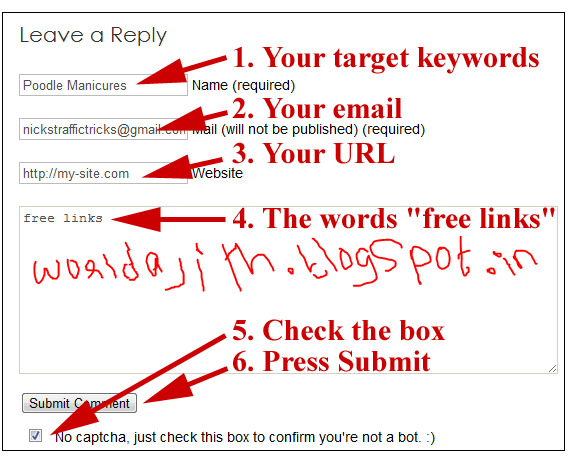
2013 free one-way build Back link for bloggers . this is the new tricks for 100 % working back links . in a one blogger important one think is this back links .today was say to you how will be create any sites to back links . in this back links will help to you better SEO on you blog or websites below i was talking about how to create back links with the help of images . now you can follow to me on the description and with images you will be a care full 


                    HOW WILL BE CREATE A BACK LINKS EASILY


  • LOG ON ANY WEBSITES OR BLOG 
  • ADD COMMENT
  • NOW YOU WILL FOLLOW INSTRUCTIONS PLEASE FOLLOW ME


  • NOW YOU WILL CLICK THE PUBLISH BUTTON
  • AFTER YOUR PUBLISHING COMMENT IS PLEASE LOOK BEFORE IMAGE
                                                                       
  • NOW YOU WAS CREATED A BACK LINKS
AND YOU WILL FINISH ALL THE STEPS
                                                                                   HAPPY BLOGGING

Posted By Unknown5/30/2013